
HappyMod iOS – Why It Does Not Exist on iPhone and What Actually Works (2026)
HappyMod does not exist on iOS – not because of an App Store policy decision, but because of an architectural incompatibility between Android APK format and Apple’s iOS runtime. Muhammad Sheraz tested known fake iOS sites on a secondary device before publication to document what they actually deliver.
If you are on Android, download the verified HappyMod APK.
Can you install HappyMod on iPhone?
No. HappyMod is an Android app packaged as an APK file.
iPhones run iOS, which cannot execute APK files.
There is currently no official iOS version of HappyMod.
Reviewed by: Muhammad Sheraz | APK Reviewer, HappyModdAPK.net
Scope: iOS 14 through iOS 18 | iPhone SE (2nd gen) through iPhone 16 series
Last reviewed: March 2026 | Applies to HappyMod v3.2.6
Jump to your situation:
Came here expecting an iOS download button -> Section 1 – read before doing anything else
Wondering if jailbreaking enables HappyMod -> Section 2 – Jailbreak Explained
In the EU – wondering if DMA sideloading helps -> Section 3 – EU Sideloading
Found a site claiming to offer HappyMod for iPhone -> Section 4 – How Fake iOS Sites Work Looking for what iOS users can actually do -> Section 5 – Legitimate iOS Alternatives
Section 1 – What HappyMod Is and Why iPhone Cannot Run It
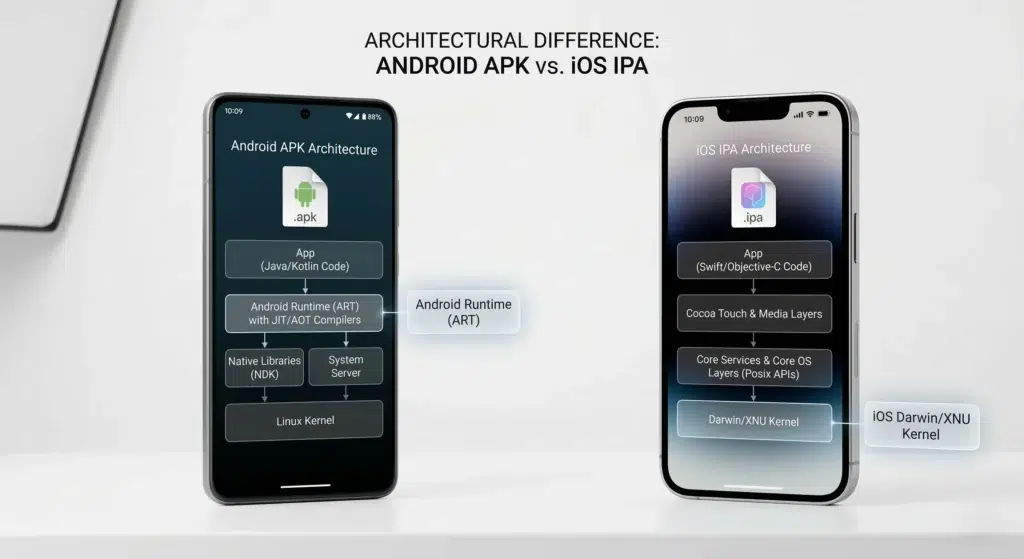
HappyMod is distributed as an APK file – Android Package – compiled for the Android Runtime (ART), which executes Dalvik bytecode on top of a Linux kernel. This is not a policy restriction that Apple could lift or that AIO TEAM could work around. It is a binary format and runtime architecture question.
Why APKs Cannot Run on iOS – The Technical Mechanism
iOS devices run a completely different operating system. Apple’s platform uses the Darwin/XNU kernel and a different application format called IPA – iOS App Store Package – compiled for Apple’s own ARM64 binary format via Xcode. An APK file and an IPA file are not interchangeable packages for the same runtime. They are compiled artifacts for two entirely separate runtime environments.
There is no layer on any iPhone or iPad that can interpret or execute Android Dalvik bytecode. The Android Runtime – the software component that reads APK files and runs them – does not exist on iOS. Jailbreaking does not install it. No third-party app installs it. The incompatibility sits at the runtime and binary format level, not at the App Store policy level.
An APK file on an iPhone is an inert data archive. The device has no mechanism to open, parse, or execute it – the same way a Windows .exe file cannot run natively on a Mac without a compatibility layer. No compatibility layer for Android bytecode currently exists on iOS.
What This Means Practically
AIO TEAM has not released an iOS version of HappyMod. No announcement has been made through their official channels as of the date of this review. The platform is Android-exclusive by design – the catalog model depends on APK format distribution, which is Android-native.
If a site offers a download button labelled ‘HappyMod for iOS’ or ‘HappyMod iPhone APK’ – the file it delivers cannot function as described. Section 4 documents exactly what these sites deliver instead of HappyMod.
Architecture vs Policy – The Key Distinction
Policy restriction: Apple could theoretically approve HappyMod for the App Store. AIO TEAM could theoretically submit it.
Architectural incompatibility: iOS devices have no Android Runtime. They cannot execute APK bytecode regardless of any policy change.
The barrier to HappyMod on iOS is architectural, not political. This distinction is why no workaround or policy change resolves the problem.
If you are on Android, the complete sideload and installation steps are on the HappyMod installation guide.
Section 2 – Jailbreaking and HappyMod – What Jailbreaking Actually Enables
A significant share of users searching ‘HappyMod iOS’ believe jailbreaking resolves the problem. It does not – but the reason it does not is specific and worth understanding, because competitor pages uniformly get this wrong by being vague rather than mechanically accurate.
What Jailbreaking Actually Does
Jailbreaking exploits a vulnerability in iOS to remove Apple’s code-signing enforcement. This enables installation of unsigned IPA files – iOS application packages – without App Store approval. A jailbroken iPhone can install iOS apps that Apple has rejected or would reject. Jailbreaking operates entirely within the iOS runtime environment.
It removes a gating mechanism. It does not replace the operating system or add new execution capabilities.
What Jailbreaking Does Not Do
Jailbreaking does not install Android Runtime on the device. A jailbroken iPhone is still an iPhone running iOS on Apple Silicon. It does not enable APK file execution. APKs require Android Runtime bytecode interpretation, which does not exist on iOS regardless of jailbreak status.
A jailbroken iPhone cannot run HappyMod or access its catalog in any functional form.
The Hard Distinction – Stated Once
Jailbreaking removes Apple’s App Store gating for iOS applications.
The barrier to HappyMod on iOS is not Apple’s gating policy. It is the absence of the Android Runtime that APKs require to function.
These are different problems with different solutions. Jailbreaking solves the first. Nothing currently solves the second on iOS hardware.
| What Jailbreaking Enables | What Jailbreaking Does NOT Enable |
|---|---|
| Installing unsigned IPA files (iOS format) | Installing or running APK files (Android format) |
| Third-party iOS tweaks modifying system behaviour | Running HappyMod in any form |
| Apps rejected or removed from the App Store | Access to HappyMod’s mod catalog |
| Custom themes and system-level UI changes | Android emulation of any kind |
Jailbreaking Risks – Documented
- Voids manufacturer warranty on all Apple devices permanently. Apple’s policy does not distinguish between jailbroken and stock devices once a jailbreak is detected.
- Creates persistent security vulnerabilities that cannot be patched without restoring to factory settings.
- Most jailbreaks are iOS version-specific. They stop functioning after Apple patches the exploit in a subsequent update.
- Specific jailbreak tools on specific iOS versions have caused permanent device failure during the jailbreak process itself.
Section 3 – EU Digital Markets Act Sideloading and HappyMod – The Honest Answer
Since iOS 17.4, Apple has allowed alternative app marketplaces and direct IPA sideloading for EU users under Digital Markets Act compliance. EU users can install apps from third-party marketplaces and, with developer mode enabled, install IPA files directly without App Store approval.
This is the iOS equivalent of enabling Unknown Sources on Android – it changes who controls distribution gating, not what the device can execute.
Why HappyMod Still Does Not Work Under EU DMA
This section applies to users in the European Union only. If you are outside the EU, this section does not change the conclusion: HappyMod does not exist on iOS. Skip to Section 4 or Section 5.
EU sideloading enables distribution of IPA files – iOS application packages compiled for Apple’s ARM64 runtime. HappyMod’s codebase is compiled for Android Runtime and packaged as an APK – a completely different format for a completely different execution environment.
For HappyMod to be available via EU sideloading, AIO TEAM would need to build a native iOS application from the ground up, compile it for Apple Silicon, sign it for distribution, and publish it through an EU-accessible channel. AIO TEAM has not done this. No announcement has been made as of the date of this review.
EU DMA Summary
EU DMA compliance on iOS 17.4+: changes distribution gating – allows IPA files from alternative marketplaces.
Does not change: the runtime environment. iOS cannot execute APK files under any distribution policy.
HappyMod status under EU DMA: unchanged. No iOS build exists to distribute. AltStore (EU alternative marketplace): documented in Section 5 – does not provide a HappyMod-equivalent catalog.
EU sideloading changes who controls distribution gating on iOS. It does not change the fundamental runtime incompatibility between Android APKs and the iOS execution environment. The architectural barrier described in Section 1 is unchanged by EU DMA compliance.
Section 4 – What Fake HappyMod iOS Sites Actually Deliver – Three Mechanisms Documented
Muhammad Sheraz tested a known fake HappyMod iOS site from a secondary device before writing this section. The delivery mechanism is documented from direct observation – not sourced from other sites.
Three distinct delivery mechanisms operate across the fake iOS site category. Each one is a named technical construct with specific identification signals.
Mechanism 1 – MDM Profile Installation (Highest Risk)
The download button on these sites triggers a prompt to install an MDM (Mobile Device Management) configuration profile. MDM profiles are designed for enterprise device management. They can remotely configure settings, install certificates, and on some builds monitor device activity. They are not applications.
If an MDM profile was already installed: Go to Settings > General > VPN and Device Management. Tap the profile name. Tap Remove Profile and enter your passcode to confirm. Deleting the home screen icon alone does not remove the profile. The profile must be removed from VPN and Device Management.
Mechanism 2 – App Store Affiliate Redirect
The download button redirects to an unrelated app in the App Store – typically a free-to-play game, VPN, or utility application. The fake site earns an affiliate commission when the App Store app is installed by the user.
No HappyMod functionality is delivered at any point. The redirect itself is the entire monetisation mechanism.
Identification signal: The download button opens the App Store to a page for a completely unrelated application. The app name, icon, and description will have no connection to HappyMod.
Mechanism 3 – Web Clip Shortcut
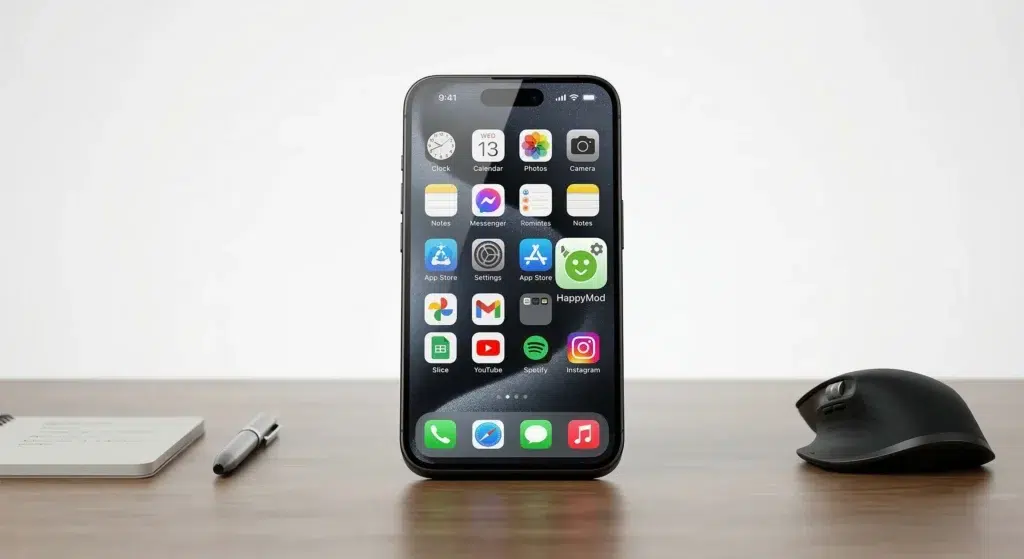
The download button adds a home screen icon that links to a mobile-optimised website. The icon uses HappyMod’s visual identity and is designed to be indistinguishable from a native app icon. Tapping it opens a browser session styled to resemble HappyMod’s interface.
No application is installed. The interface cannot download or install mod files. These sites generate revenue through ad impressions and affiliate redirects served inside the browser session.
Identification signal: No iOS installation dialog appears. The icon appears immediately after tapping ‘Add to Home Screen’ in the browser prompt. Tapping the icon opens a browser tab – not a standalone app. The icon can be removed via ‘Remove Bookmark’ in Safari – not ‘Delete App’ – because it is not an app.
How to Identify a Fake HappyMod iOS Site – 4 Steps
- Check the domain. Any site offering iOS downloads that is not an official source. AIO TEAM has made no iOS release through any domain.
- Read what the download button triggers. If tapping the button opens a dialog asking you to install a Configuration Profile, close immediately and do not proceed. This is an MDM profile – not an app installation.
- Look for a native iOS installation dialog. Legitimate app installations on iOS always show an App Store-style installation prompt or a developer-signed IPA prompt. If no such prompt appears after you tap the download button, no application is being installed.
- Check what appears on your home screen. If an icon appears without any installation dialog having occurred, this is a web clip shortcut – not an app. Remove it via ‘Remove Bookmark’ in Safari. Do not search for it as an installed app – it will not appear in Settings > Apps because it is not an app.
Section 5 – Honest Alternatives for iOS Users – What Exists and What It Actually Delivers
No iOS-native application replicates HappyMod’s catalog model – a community-submitted archive of modified third-party APKs available in one place. App Store policy prohibits distributing modified versions of third-party applications.
This is not a gap that workarounds or alternative apps fill. The categories below are honest about what each one delivers.
Category 1 – Android Emulation on iOS Hardware
Apple relaxed App Store policies on emulators in 2024, making it technically viable to distribute Android emulators through the App Store or EU alternative marketplaces. In theory, if a stable Android emulator ran APKs at usable performance on an iPhone, HappyMod could function within it – because the emulator would provide the Android Runtime that iOS lacks natively.
In practice, no full Android emulator is publicly available through the App Store or EU sideloading that replicates the performance needed for mod-heavy gaming at the time of this review. The theoretical path exists. The viable implementation does not yet.
Category 2 – Official iOS Versions of Games in HappyMod’s Catalog
Many games available through HappyMod’s catalog have separate iOS versions on the App Store. These are official, unmodified releases from the game developers – not modified builds.
These answer the question: ‘I want to play this game on my iPhone.’ They do not answer: ‘I want HappyMod’s features on my iPhone.’ The distinction is direct: official iOS releases do not include unlocked resources, unlimited in-game currency, removed ads, or other modifications that HappyMod mod versions provide. Both answers need to be stated explicitly rather than letting users draw their own conclusions.
Category 3 – AltStore and IPA Sideloading
AltStore is a legitimate third-party app marketplace that enables installation of developer-signed IPA files on non-jailbroken iPhones. In the EU, iOS 17.4 users can access AltStore as an approved alternative marketplace under DMA compliance without additional device configuration.
What AltStore enables: installation of specific IPA files for specific apps. Delta (Nintendo game emulator) and UTM (virtual machine environment) are the documented primary use cases with confirmed stable performance.
What AltStore does not enable: a HappyMod-equivalent catalog. The modified third-party game files that HappyMod distributes as Android APKs do not have iOS equivalents in IPA format. They do not exist as IPA files to sideload. AltStore is documented here as the honest answer to ‘can I sideload apps on iOS’ – not as a HappyMod alternative, because it is not one.
For users who want to access HappyMod through an Android emulator on a Windows or Mac computer, see the HappyMod for PC guide.
| Option | What It Delivers | HappyMod Equivalent? |
|---|---|---|
| Android emulator on iOS | Android APK execution in theory – no stable public option at review | In theory yes – no viable option currently exists |
| Official iOS App Store games | Original unmodified game releases | No – no modded features, no catalog |
| AltStore / IPA sideloading | Specific developer-signed IPA files for specific apps | No – mod catalog does not exist in IPA format |
| Jailbreaking | Unsigned IPA installation, iOS-level system tweaks | No – APKs still cannot execute on iOS |